


Tags are additional bits of information that describe Rust servers. The server browser allows players to search for different filter combinations to find a server that they might like. Up to four of them will be displayed on the Rust server browser at a time.
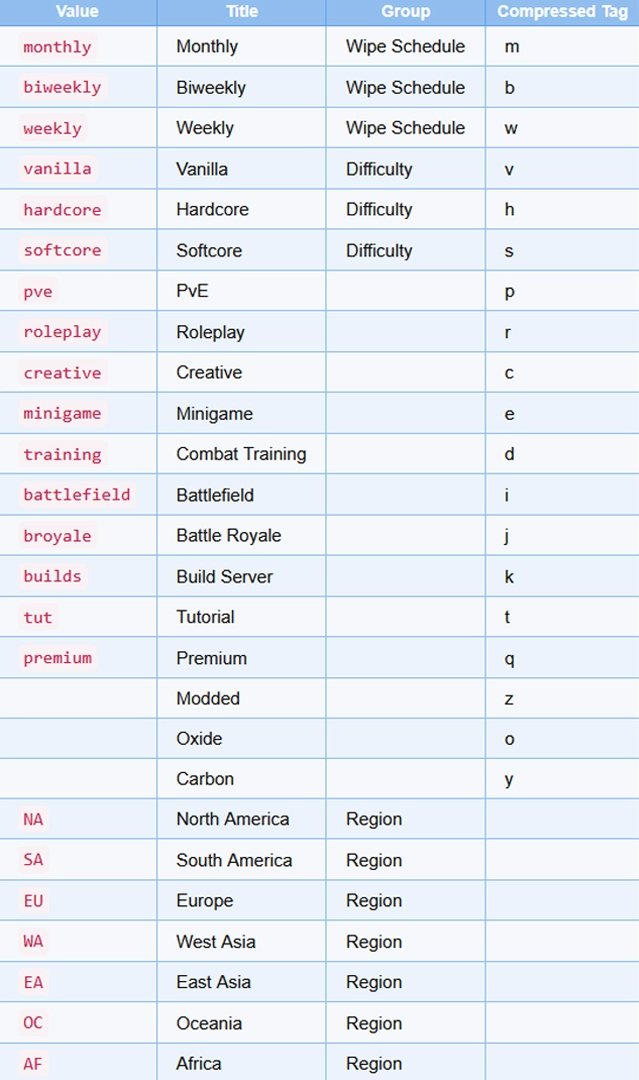
The following tags are defined:
How do I add them to my server?
Set the server.tags convar to the comma-separated tag values you wish to use from the table above. For example, if you want the Weekly, Vanilla, and Roleplay tags applied you would use server.tags weekly,vanilla,roleplay.
Note that some tags may be set by other convars. For example, server.pve will automatically apply the PvE tag.
You should not specify multiple tags from the same group (see table above) on the same server. Being in the same group means the tags are mutually exclusive - for example, it doesn't make sense for a server to wipe both monthly and weekly, or a server to be both hardcore and softcore. The server browser will only show one of the tags from the group but this will not work properly with search and cause your server to not show up for specific tag queries.
Comments (0)