NewRust Server List is live: live players, wipes and one-click connect. List your server for free.Rust Server List is liveSee servers
How to Get Players on a New Rust Server (and Keep Them)


You have rented a machine, installed the server, tested it with a friend and opened it to the world. The browser shows it with zero players, and it stays at zero, because players scrolling the list skip empty servers and an empty server never gets the first few people who would make it look alive. Breaking that loop is less about advertising than about looking trustworthy at the exact moment players are choosing.
Players pick a server in seconds from its name, tags, description and wipe date, and they stay for a fixed schedule, a smooth server and admins they can reach. Get the browser details right, launch on a wipe day, list the server where players look, give it a community, and keep every promise in the description. Nobody can guarantee a population; these steps give a new server a fair chance.
This guide is for owners opening a new community server, or relaunching one that never took off. The settings named are the real ones in the current game, checked against the server code of the November 2026 build and Facepunch’s wiki; the rest is practice from running and watching servers, not a formula.
What players see before they click
In the server browser a player sees very little: the name, the player count and queue, the tags, and, on the server’s page, the description, website and header image. The server also reports when its current save was created, which is how players and tracking sites tell how long ago it wiped. That is the entire sales pitch, so every piece has to work:
- Name (
server.hostname): what the server is and how often it wipes, readable at a glance. “Vanilla | Monthly | EU | Max 4” tells a player more than a long string of symbols and claims. - Description (
server.description): the group limit, the wipe days and time with a time zone, the main rules, what plugins change, and where your community lives. - Header image and logo (
server.headerimage,server.logoimage): your own artwork on a link that stays online. A broken image reads as an abandoned server. - Website (
server.url): somewhere with the rules and the wipe schedule, even if it is a single page.
The server.cfg guide covers each of these lines and their limits, including the 1,600-character cut-off of the description.
Tags put you in the right searches
Many players never scroll the full list: they filter. Tags are how a filtered search finds you, and the game is strict about them. It accepts only Facepunch’s tags and keeps four at most, in a fixed order: one wipe schedule (monthly, biweekly, weekly), one difficulty (vanilla, hardcore, softcore), server types such as roleplay, creative, minigame, builds or broyale, and then one region code such as EU or NA.
Two consequences matter for a new server. First, a tag that lies costs you players twice: the ones it attracts leave, and the ones who wanted what you really offer never see you. Second, because the region comes last, a server that sets a schedule, a difficulty and two types loses its region tag without any warning. Check the result by typing server.tags in the console.
Pick a wipe schedule and keep it
The wipe schedule is the biggest single promise a Rust server makes. Players plan their week around it, and many look for servers by wipe day.
Facepunch releases its monthly update on the first Thursday of the month, and that update forces a new map on every server; the most recent one was 5 November 2026, so the next falls on 3 December. Between forced wipes the schedule is yours: weekly, every two weeks or monthly. Whether blueprints are wiped as well is also your decision, unless the update forces it, as the November 2026 one did: after each update, check whether a new player.blueprints file with a higher number appeared in your identity folder, and read that month’s notes.
Whatever you choose:
- Make the tag match it, so filtered searches are honest.
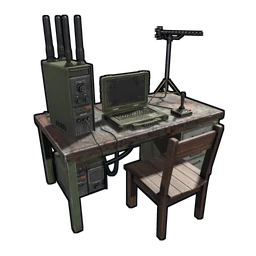
- Set the in-game wipe timer to match it. The timer drives the countdown on the laptop in the Missile Silo and starts the endgame events before the wipe. By default it expects Thursday at 19:00 London time; change
wipetimer.wipedayofweek,wipetimer.wipehourofdayandwipetimer.wipetimezoneif yours differs. - Write the day, time and time zone in the description, and announce each wipe in advance.
- Never move a wipe at short notice. Nothing empties a server faster than players logging in to a fresh map they were not told about.

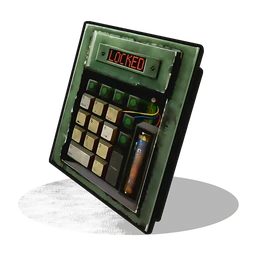
The in-game wipe countdown, which follows the wipe timer settings, so they must match the schedule you promise. Image: Facepunch Studios.
Launch on a wipe day
The day a map wipes is when players are actively looking for somewhere new, and a fresh map puts everybody on equal terms. Opening a new server in the middle of a wipe asks newcomers to join a map where others already have bases and guns; opening on wipe day asks them to start together.
- Open at a time that suits your region, ideally the evening, when players in that region are online. Your description’s time zone should match.
- Be online yourself for the first hours. New players test a server by asking questions in chat. An answer within minutes is the best advert you have.
- Open finished. Plugins configured, the map tested, the rules written. Fixing things live on launch night is how first impressions are lost.
Where players find servers
The in-game browser lists your server automatically through Steam, as long as the query port is open; Facepunch’s wiki notes that the server will not appear in the browser without it. Everything else is something you do:
- Server lists and trackers. Players search sites that list Rust servers by country, wipe day and population. On badgyver.com there is a free Rust server list where players browse servers and owners add theirs at no cost.
- A name players can type. Point a DNS name at the server and set
server.favoritesendpointto it. Players then favourite the name rather than the IP address, so their favourite survives a change of host, and you can print the address anywhere. - Your own channels. Clips, wipe-day announcements and a short honest pitch posted where Rust players already talk, following each community’s rules on self-promotion.
Be careful with anything that inflates numbers: fake player counts, paid votes or reviews, bots that join to look busy. Players notice the gap between a full browser entry and an empty map within minutes, and they do not come back. A small real population grows; a fake one only falls.
A Discord that does a job
A Discord server is where a list of strangers becomes a community, and where people come back between wipes. It works when every channel has a purpose:
- Announcements for wipe times, changes and events, posted before they happen.
- Rules, the same ones as in the server description.
- Support and reports, with a clear way to appeal a ban.
- Looking for group, so solo players find teammates instead of quitting.
Keep it small at first. Ten channels for five members looks emptier than three channels with conversation in them.
What makes players stay
Getting a player to join once is the easy half. Every one of these is about the second visit:
- Performance. Rubber-banding in week two drives out the players week one brought in. The guide to reducing server lag covers the settings and habits.
- A schedule that never moves and rules that do not change mid-wipe.
- Admins who answer, and who play fair themselves.
- A map with identity. A map players can describe to a friend, with places worth travelling to and room to build, gives them a reason to choose you over a thousand procedural servers. My RATS 2 map, for example, leaves over 71% of its land buildable.
- Something on the calendar. Events, seasonal nights and weekend arenas give the whole server a reason to log in at the same time.
- Rust+ working, so players get their raid alarms and camera checks on the phone. That needs the companion port (
app.port) open, as Facepunch’s wiki describes.
Events do not have to cost you every evening. My Halloween plugin runs a whole seasonal horror event by itself, which is the kind of night that brings players back to check what is new.
The checklist
- A clear name, a description with wipe day, time and time zone, a working header image and a website.
- Tags that tell the truth, checked with
server.tags. - A wipe schedule chosen, written down, matched in the wipe timer and never moved at short notice.
- A launch on a wipe day, at an evening hour for your region, with you online.
- The query port open, a DNS name with
server.favoritesendpoint, and the server added to the lists players use. - A small Discord with announcements, rules, support and looking-for-group.
- A plan for the second visit: performance, events and a map worth coming back to.
Where Badgyver comes in
I build custom Rust maps, arenas and plugins for exactly this problem: giving a server something players cannot find on the procedural server next door. Questions about any of it come straight to me on Discord.